Mock sink
A sink that always says yes proves almost nothing. Retry, backoff and the dead letter queue are only observable if the receiving end can fail on purpose.
The mock sink is a stand-in consuming application that does exactly that. It
runs on localhost:3004 with a console at
/ui.
Start it and point the Center at it
cd sink-test
npm install
cp .env.example .env
npm run start:dev
Then set your SINK integration's endpoint URL to:
http://localhost:3004/sink
Press Test on the integration — it should go green. (The mock answers the
reachability ping on HEAD /sink, which is what that button uses.)
Now send something with the mock source and watch it land.
See what actually arrived
localhost:3004/ui is a live feed — deliveries are
pushed as they arrive, not polled.
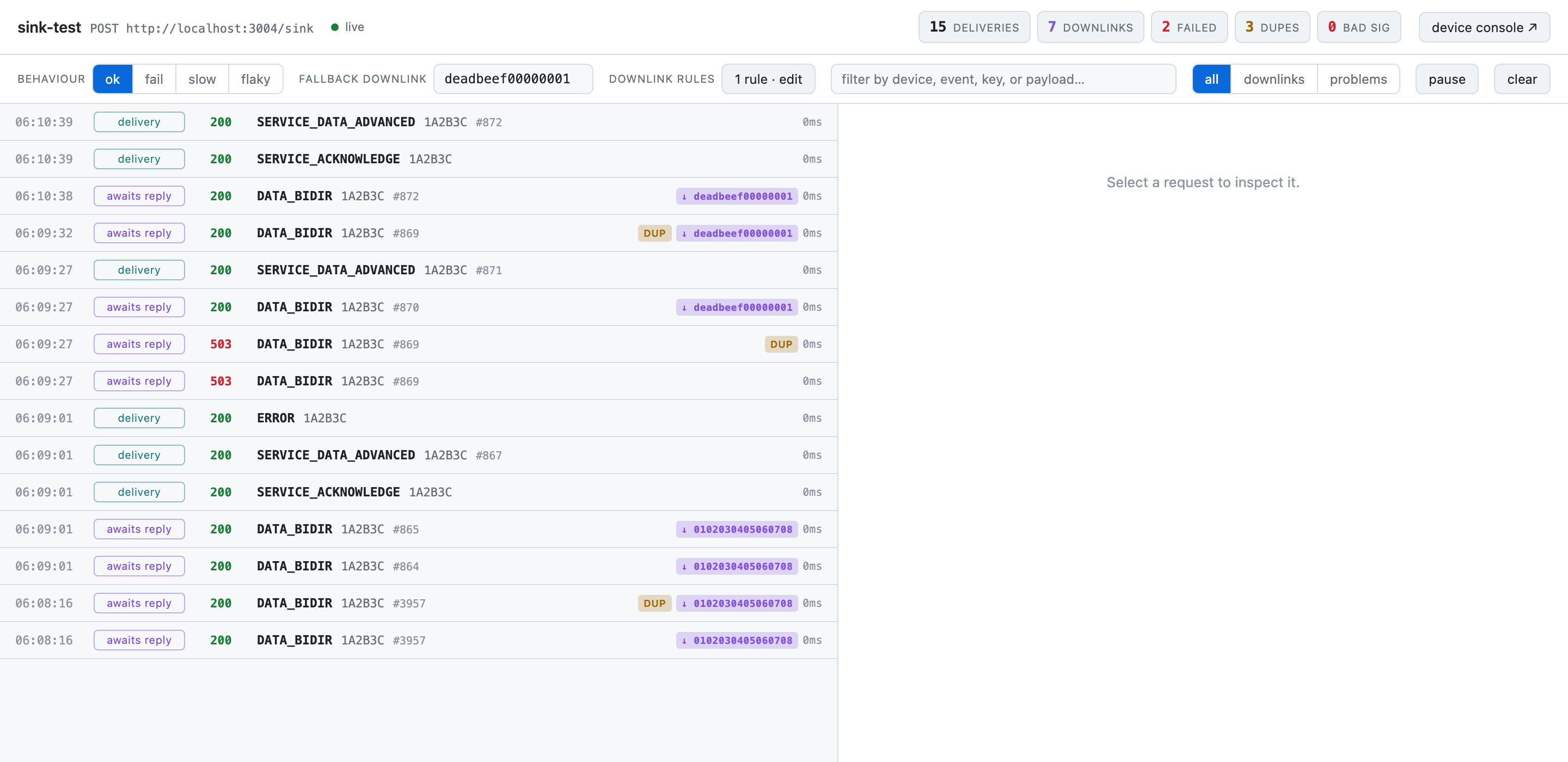
The header is also the control panel: the behaviour mode, the fallback downlink
and the active rules are switchable without leaving the page. The counters —
deliveries, downlinks, failed, dupes, bad signature — are the fastest read on
whether a test did what you expected. Here two rows answered 503 because the
sink was in fail mode, and two are flagged DUP.
Click any row for the whole exchange: headers, request body, response body, with the signature verdict spelled out in words.
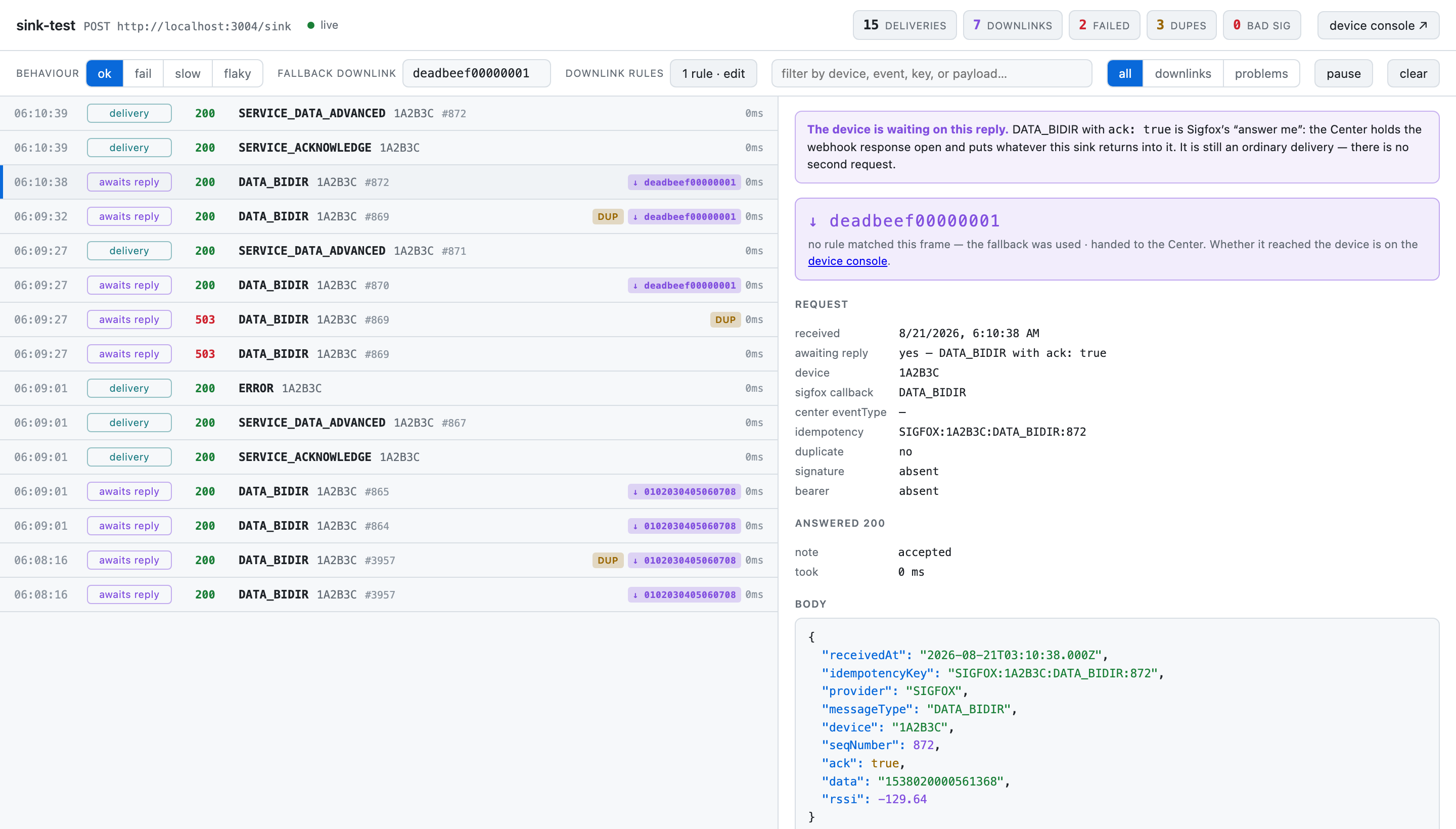
The banner at the top is there because this is a DATA_BIDIR with ack: true —
the one kind of delivery whose response is load-bearing. Below it, the downlink
that went back and whether a rule chose it or the fallback was used; then the
request metadata, including the idempotencyKey your side should be
de-duplicating on.
Two details make it more useful than a terminal:
- Rows are labelled by
messageType— the one name the Center uses for a message, which for Sigfox is the callback (DATA_UPLINK,DATA_BIDIR, …) —uplink— so a list keyed on it cannot tell you which callback arrived, which is exactly what you need to know when a downlink is involved. The row saysDATA_BIDIR (0/3). awaits replymarks a delivery whose response is load-bearing — aDATA_BIDIRwithack: true, where the device is holding its window open.
Filter by downlinks, or by problems — anything that was not a clean accept: a
non-2xx, a duplicate, or a bad signature.
The log is on HTTP too:
curl -s localhost:3004/log
curl -X DELETE localhost:3004/log
Make it misbehave
One endpoint switches the behaviour at runtime:
curl -s localhost:3004/control                      # what is it doing now?
curl -X POST localhost:3004/control \
  -H 'content-type: application/json' \
  -d '{"mode":"fail","failStatus":503}'
Four modes, and what the Center should do in each:
| Mode | The sink does | Expect the Center to |
|---|---|---|
ok | 200 on everything | Mark it delivered |
fail | Returns failStatus (default 500) | Retry with backoff, then dead-letter it after eight attempts — keeping the body so it can be replayed |
slow | Answers after slowMs (default 20000) | Hit the sink adapter's 15s timeout — a transport error, which is a different retry path from a 5xx |
flaky | Fails flakyFailures times, then succeeds | Mark it delivered with more than one attempt — not dead-lettered |
Switching mode resets the flaky counter, so a second flaky run does not start already used up. A mode change never blanks settings you did not mention.
A worked example: watch a dead letter appear
# 1. Make the sink refuse everything
curl -X POST localhost:3004/control -H 'content-type: application/json' \
     -d '{"mode":"fail","failStatus":503}'

# 2. Send a message
curl -X POST localhost:3003/emit/bidir

# 3. Watch Analytics: Failed climbs as attempts are retried.
#    After eight, the delivery lands in Dead letters.

# 4. Fix the "outage"
curl -X POST localhost:3004/control -H 'content-type: application/json' -d '{"mode":"ok"}'

# 5. Open Dead letters in the Center and hit Replay — it now succeeds.
That loop is the whole delivery contract in five commands: at-least-once, backoff, dead letter, replay.
A worked example: prove retry is not data loss
curl -X POST localhost:3004/control -H 'content-type: application/json' \
     -d '{"mode":"flaky","flakyFailures":2}'
curl -X POST localhost:3003/emit/bidir
The first two attempts fail, the third succeeds. The message is delivered, not dead-lettered — and the delivery record shows more than one attempt. This is what a brief sink outage looks like when nothing is actually wrong.
Answering a downlink
When a delivered message asked for a downlink, the reply to that same request is what answers the device. So the mock sink can act as the far end of a downlink bridge with no extra wiring.
Set a fallback answer:
curl -X POST localhost:3004/control -H 'content-type: application/json' \
     -d '{"downlinkHex":"deadbeef00000001"}'
The hex must be exactly 16 characters — Sigfox downlinks are 8 bytes — or the Center discards it.
Let the message decide
A real application does not reply with a constant; it looks at what the meter reported. Rules model that: when all these conditions hold, answer with this hex. First match wins.
curl -X POST localhost:3004/control -H 'content-type: application/json' -d '{
  "downlinkRules": [
    { "name": "low battery", "downlinkHex": "deadbeef00000001", "when": [
      { "path": "messageType", "op": "eq", "value": "DATA_BIDIR" },
      { "path": "ack", "op": "eq", "value": true },
      { "path": "payload.alarms.LowBattery", "op": "eq", "value": true }
    ]}
  ]
}'
Operators are eq, neq, gt, lt, contains, exists and missing. Values
are compared loosely by type, so the boolean true matches the text true.
payload.alarms.LowBattery, at
telemetry.alarms.LowBattery, or not at all — it depends on the
output structure set on that source →
sink pair. A rule written against a guessed path simply never fires. The console
records every path it has actually received and suggests them, showing the last
value beside each, so write rules from that list rather than from memory.You can edit all of this in the console instead — downlink rules → edit — where the behaviour mode and fallback hex are switchable from the header too.
Where each console stops
The mock sink tells you what the application received. It cannot tell you whether a downlink it offered actually reached the device — that is the mock source's console, which shows the round trip from the device's side.
Use them together: one end proves what was sent, the other proves what came back.
In the cloud
The same rig runs on Dokploy at sink.iot.una.center: the production
Center's delivery workers POST to https://sink.iot.una.center/sink exactly as
they would to a customer's endpoint, and the console is at
/ui. Its log lives in memory — a redeploy
empties it. It is a public endpoint that answers ok to anything: stop the
app when nobody is testing.