Mock source
Testing an ingest pipeline usually means waiting for a device to transmit. The mock source removes that wait: it posts the exact callback bodies a real Sigfox backend would send, at your source's ingest endpoint, on demand.
It runs on localhost:3003 with a console at
/ui.
Which source it needs in the Center
The mock is not a technology of its own: it impersonates a real backend — Sigfox Backend, The Things Stack or ChirpStack, chosen first in the console — and posts the exact bodies that backend would. So the source it feeds in the Center is an ordinary source of that technology: pick Sigfox when the mock runs in Sigfox mode, The Things Stack when it runs in TTN mode. The Center's real adapter parses the callbacks, which is the whole point; a "mock" technology would only bypass it. If you want to exercise both, create one source per technology and point the mock at whichever you are testing.
Start it
cd source-test
npm install
cp .env.example .env
npm run secret        # prints the source's webhook secret
# paste that into .env as WEBHOOK_SECRET
npm run start:dev
npm run secret decrypts the shared secret of the source integration you are
testing, straight from your local database. Nothing leaves the machine.
Without WEBHOOK_SECRET the callbacks go out unauthenticated and the Center
answers 401 — which is a useful test in itself, just not the one you usually
want first.
Check what it is pointed at before firing anything:
curl -s localhost:3003/health
That returns the ingest URL it will post to, the device it will pretend to be, whether a secret is configured, and the callbacks it knows about.
Send one message
curl -X POST localhost:3003/emit/bidir
That posts a complete, well-formed DATA_BIDIR callback to your source's ingest
endpoint. Watch Analytics in the Center — Received goes up — or watch the
mock sink receive the delivery.
The route accepts either the short name or the Sigfox messageType:
| Short name | messageType | Sigfox key |
|---|---|---|
uplink | DATA_UPLINK | 0/2 |
bidir | DATA_BIDIR | 0/3 |
status | SERVICE_STATUS | 1/0 |
acknowledge | SERVICE_ACKNOWLEDGE | 1/4 |
repeater | SERVICE_REPEATER | 1/5 |
advanced | SERVICE_DATA_ADVANCED | 1/6 |
error | ERROR | 2 |
So POST /emit/DATA_BIDIR and POST /emit/bidir do the same thing.
What actually gets posted
A bidir call sends this body — the same fields, in the same order, that the
Center registers on the real Sigfox device type:
{
  "messageType": "DATA_BIDIR",
  "device": "1A2B3C",
  "deviceTypeId": "6a78e0b0ec27932950396541",
  "time": 1755265665,
  "seqNumber": 18,
  "data": "00018d460000300040e12402",
  "ack": true,
  "rssi": -103.41,
  "station": "0A1B"
}
ack: true is the important one: it means the device is asking for a downlink
and is holding its receive window open. See
Respond with a downlink.
Bend any field
Every top-level key that is not a control key is merged into the callback body. So changing the payload frame is just:
curl -X POST localhost:3003/emit/bidir \
  -H 'content-type: application/json' \
  -d '{"data": "00018d460000300040e12402"}'
The control keys — the ones that steer the mock rather than the body — are:
| Key | Does |
|---|---|
types | POST /emit only: which callbacks this transmission produces |
delayScale | Multiply the realistic delays. 0 fires everything at once |
wait | Block until the late callbacks have gone too |
device | Pretend to be a different device id |
seqNumber | Pin the sequence number (0–4095) |
count | Send this many messages, sequentially (max 200) |
overrides | Merged last — use when a field name collides with a control key |
omitSecret | Drop the secret header; the Center must answer 401 |
Three tests worth running
Does de-duplication work?
The Center delivers at least once, and your sink is supposed to recognise a repeat. Force one by reusing a sequence number:
curl -X POST localhost:3003/emit/bidir -H 'content-type: application/json' -d '{"seqNumber": 42}'
curl -X POST localhost:3003/emit/bidir -H 'content-type: application/json' -d '{"seqNumber": 42}'
Both arrive with the same idempotencyKey. The mock sink flags the second as
DUP.
Is the endpoint actually protected?
curl -X POST localhost:3003/emit/bidir -H 'content-type: application/json' -d '{"omitSecret": true}'
The Center should answer 401. If it answers 2xx, your source is accepting unauthenticated payloads — see Connect a source.
What does load look like?
curl -X POST localhost:3003/emit/bidir -H 'content-type: application/json' -d '{"count": 50}'
Fifty messages, sent sequentially. Watch Analytics and the sink's delivery list.
A whole transmission, timed like the real thing
One device transmission produces several callbacks, and they do not arrive
together. POST /emit reproduces that:
curl -X POST localhost:3003/emit \
  -H 'content-type: application/json' \
  -d '{"types": ["DATA_BIDIR", "SERVICE_ACKNOWLEDGE", "SERVICE_DATA_ADVANCED"]}'
Each is scheduled at the delay it really has:
| Callback | Arrives after | Why |
|---|---|---|
DATA_BIDIR | 0–1s | The frame is decoded immediately |
ERROR | 1–3s | The network rejects it almost at once |
SERVICE_ACKNOWLEDGE | 20–25s | The downlink window opens ~20s after the uplink |
SERVICE_DATA_ADVANCED | 25–32s | Waits for every base station that heard the frame |
"delayScale": 0 when you genuinely do not want to wait, and know that you are
testing something easier than reality.To replay exactly what your live source has enabled — rather than picking types by hand:
curl -X POST localhost:3003/emit-enabled
And to repeat the last thing you sent:
curl -X POST localhost:3003/replay-last
The console
localhost:3003/ui is the device's side of the
glass. The mock sink shows what the application received; this shows what the
device experienced — including the one thing a sink can never tell you: whether
the downlink it offered actually came back down.
Every session gets a round-trip panel: the device asked for a downlink, the Center answered with one, and here is whether it arrived.
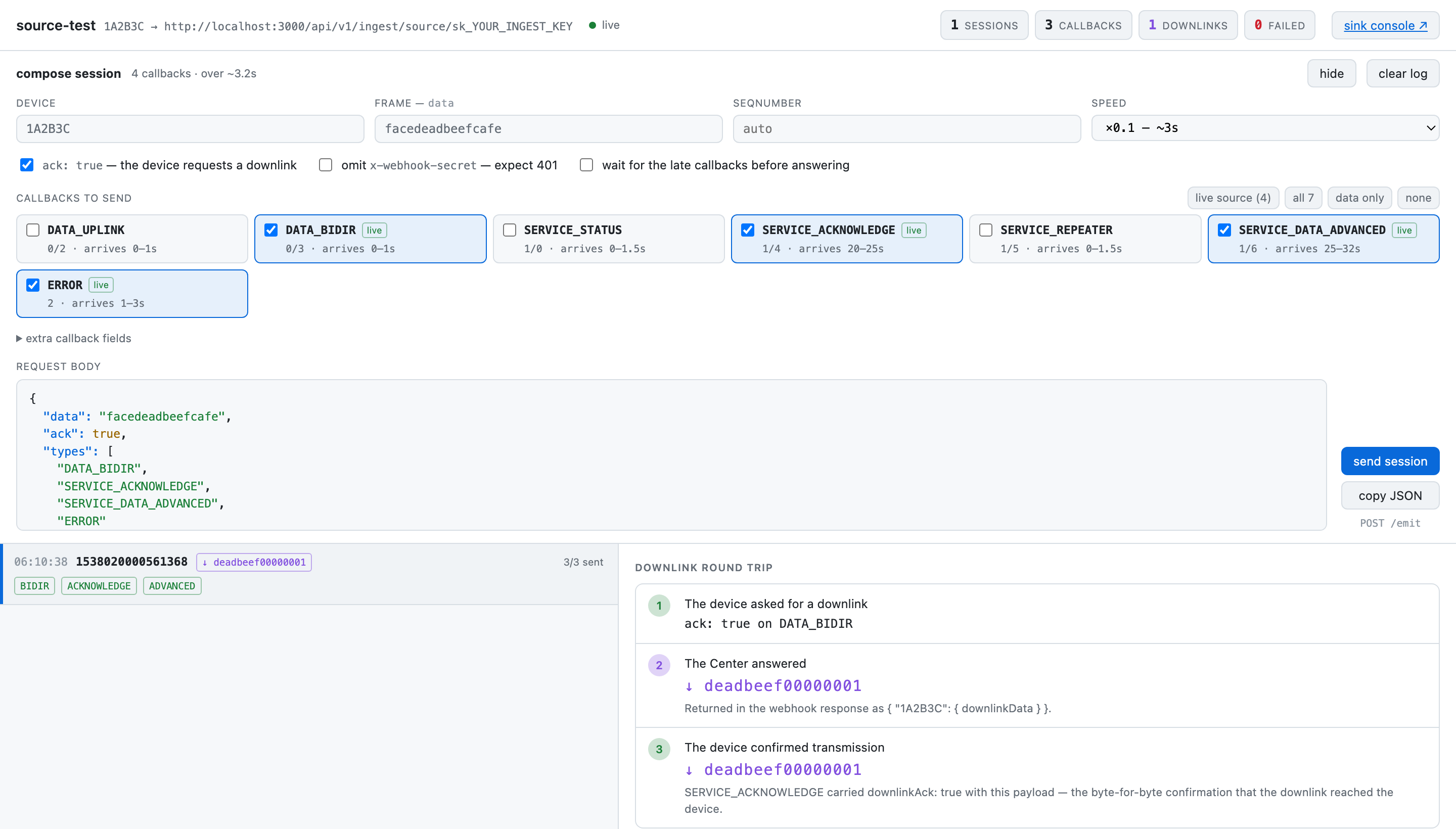
Compose a session at the top — device, frame, which callbacks, how fast — then
send session. The panel on the right is the part no sink can show you: line 3
is SERVICE_ACKNOWLEDGE carrying downlinkAck: true, the byte-for-byte
confirmation that the downlink reached the device.
The raw log is also on HTTP:
curl -s localhost:3003/log          # recent emissions
curl -s localhost:3003/runs         # sessions
curl -X DELETE localhost:3003/log   # clear it
Testing provisioning without touching Sigfox
The mock also answers the Sigfox v2 REST API the Center calls when provisioning. Point the Center at it:
SIGFOX_API_BASE=http://localhost:3003/v2
SIGFOX_LIVE=true
SIGFOX_READONLY=true
Now apply really runs — creating device types, registering callbacks, creating
devices — against an in-memory fake instead of a real account. It implements
device types, callbacks, devices, groups, contracts and api-users; anything else
404s rather than pretending to succeed.
POST /v2/_reset clears devices and callbacks so you can run the same
provisioning flow again from clean.
SIGFOX_LIVE=true is the switch that lets the Center write to a Sigfox backend
for real. It is safe here only because the base URL points at the mock. Never
set both on a Center whose SIGFOX_API_BASE is the real API unless you intend
those writes.In the cloud
The same rig runs on Dokploy at source.iot.una.center, posting to the
production Center over HTTPS exactly as a real backend would. Everything on
this page applies there with the host swapped — the console is at
/ui. The ingest URL and webhook secret
can be pasted into the console's connection panel rather than set in the
environment; the console keeps them across restarts. It is a test tool with a
public address: stop the app when nobody is testing.